ESP32.AI Quick Start Guide
Welcome to ESP32.AI! This guide will help you quickly get started with our platform and begin your journey in ESP32 smart hardware development.
YunDo V1
YunDo is an open-source intelligent dialogue system based on large models.
Project Content
Simple Flow Chart
+------------------+                                  +-----------------+
|    Client (ESP32)  |                                  |     Server        |
|                  |                                  |                 |
| +--------------+ |                                  | +-------------+ |
| | Audio Capture | |                                  | | MQTT Broker | |
| +--------------+ |                                  | +------+------+ |
|        |          |                                  |        ^        |
|        v          |                                  |        |        |
| +--------------+  |                                  | +------+------| |
| | MQTT Publish  |  +------------------------------->  | | Receive Audio| |
| +--------------+  |                                  | +------+------| |
|                  |                                  +------+------| |
|                  |                                  |       v        |
|                  |                                  | +-------------+ |
|                  |                                  | | Speech-to-Text| <----> Azure Speech-to-Text API
|                  |                                  | +-------------+ |
|                  |                                  |       v        |
|                  |                                  | +-------------+ |
|                  |                                  | |    LLM Model   | <----> Dify.ai
|                  |                                  | +-------------+ |
|                  |                                  |       v        |
|                  |                                  | +-------------+ |
|                  |                                  | | Text-to-Speech| <----> Azure Text-to-Speech API
|                  |                                  | +-------------+ |
|                  v                                  |       v        |
| +--------------+  <---------------------------------+  | +-------------+ |
| | Audio Playback|                                     | | MQTT Publish  |
| +--------------+                                      | +-------------+ |
+------------------+                                   +-----------------+
Hardware Overview
- Complete Hardware with Enclosure:
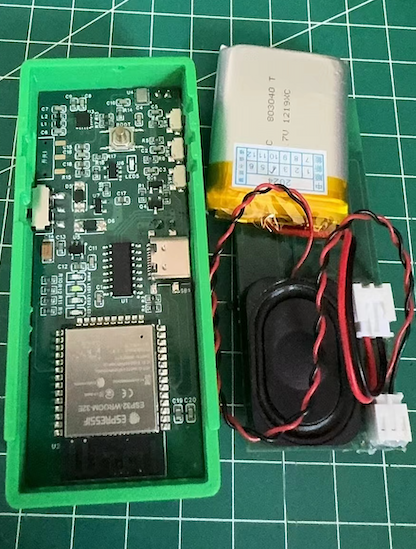
Hardware
- Based on the open-source project Esp32_VoiceChat_LLMs
Firmware
- Based on MicroPython
- Provides complete firmware code and detailed configuration instructions
Server
- Based on Python
- Integrates dify.ai's large model capabilities
- Supports multiple models as described in dify.ai
- Utilizes Azure's TTS (Text-to-Speech) and STT (Speech-to-Text) services
Key Features
- Voice Interaction: Implements natural language understanding and generation through large models, providing intelligent voice interaction experiences.
- Voice Recognition and Synthesis: Utilizes Azure's TTS and STT services for high-quality voice recognition and voice synthesis.
- Open Source and Community-Driven: All code are open-source, welcoming community contributions and collaboration.
Quick Start
- Clone this repository:
git clone https://github.com/hx23840/YunDo.git- Assemble the development board and flash the firmware according to the documentation.
Flashing MicroPython onto ESP32
Download the MicroPython Firmware:
- Visit the MicroPython downloads page for ESP32: MicroPython for ESP32
- Download the latest firmware binary file for ESP32.
Flash Firmware to ESP32:
- Follow the instructions on the MicroPython site to flash the firmware onto your ESP32 device.
Setting Up Thonny IDE
- Install Thonny:
- Download and install Thonny IDE from Thonny's website.
- Install Thonny:
Copy Firmware Files:
- Open Thonny, and connect your ESP32 device via USB.
- Use Thonny's file manager to navigate to the firmware folder.
- Copy the MicroPython code from the firmware folder on your computer to the ESP32.
- Server Configuration
Deploy the EMQX Broker:
- Follow the official deployment steps: Install EMQX
- Configure user authentication as described here: EMQX Authentication
Register with dify.ai and set up your application:
- Register at dify.ai Registration
- Create an application at Creating an Application
- Obtain API keys from Developing with APIs
Utilizes Azure's TTS and STT services:
- Register with Azure: Azure Registration
- Create Azure TTS and STT services and obtain API keys
Configure the parameters:
- Copy the
.env.examplefile to.envand update the parameters as needed.
- Copy the
cd Server
cp .env.example .env- Install dependencies and start the server:
pip install -r requirements.txt
python main.py- Start interacting with the intelligent dialogue system!
Contribution
We welcome any form of contribution, including but not limited to:
- Bug fixes
- New feature submissions
- Improvement suggestions
- Documentation enhancements
License
This project is licensed under the GNU General Public License v3.0.
Contact Us
If you have any questions or suggestions, please submit them via issues, or email our development team.
Thank you for your attention and support! Let's build a smarter and more open future together.
Happy developing on the ESP32.AI platform!